What is App-Based WiFi Onboarding and When Should You Use It?
App-based WiFi onboarding enables organizations to deliver secure, seamless, and branded WiFi access directly through their own mobile application. Instead of forcing users through generic captive portals, the branded app becomes the vehicle for frictionless connectivity—often leveraging Passpoint (Hotspot 2.0) for automatic connection the moment a user enters the venue. This approach is especially powerful in retail, hospitality, and public spaces where app adoption drives loyalty, marketing, and first-party data collection.
For executives, it transforms WiFi from a basic utility into a strategic engagement and analytics tool, reducing IT support burden while increasing customer dwell time and conversion opportunities. However, success depends on app download rates, user permissions, and long-term app maintenance. It serves as an excellent complement or transitional strategy to full native Passpoint/EAP-TLS deployments, particularly when building or enhancing a branded mobile experience is already a priority.
- • Ideal for environments with existing or high-potential branded app adoption (retail malls, supermarkets, hotels, airports, campuses)
- • Delivers branded, low-friction experience that boosts engagement and first-party data collection for marketing
- • Leverages Passpoint for automatic, secure connections without captive portals for app users
- • Reduces helpdesk tickets compared to traditional portals but requires investment in app development, SDK integration, and user acquisition
- • Excellent bridge strategy while maturing toward full certificate-based (EAP-TLS) or pure Passpoint deployments
- • Security and user experience depend on high-quality SDK implementation and clear permission flows
- • Enables location-aware features (background detection) that trigger relevant offers or services upon arrival
What is App-Based WiFi Onboarding?
App-based WiFi onboarding is a method where a brand's own mobile application handles the delivery of WiFi credentials, configuration profiles, or authentication triggers to end-user devices. Rather than relying solely on the device's native WiFi settings or a web-based captive portal, the app acts as an intelligent intermediary that authenticates the user (often leveraging existing app login or backend identity) and provisions secure network access.
Leading platforms have popularized this through their Mobile SDKs, which developers integrate directly into iOS and Android apps. The SDK enables automatic, secure WiFi connectivity powered by standards like Passpoint, combined with precise location awareness. Users no longer need to manually select an SSID, remember passwords, or interact with a portal—the app manages everything in the background once the user is in range of the venue.
This model is distinct from traditional captive portals (which are web-based and often frustrating) and from pure device-native Passpoint/EAP-TLS (which requires pre-provisioned profiles or certificates without a brand app layer). It shines when the organization wants to keep the user inside their branded ecosystem for marketing, loyalty, or service delivery while providing best-in-class connectivity.
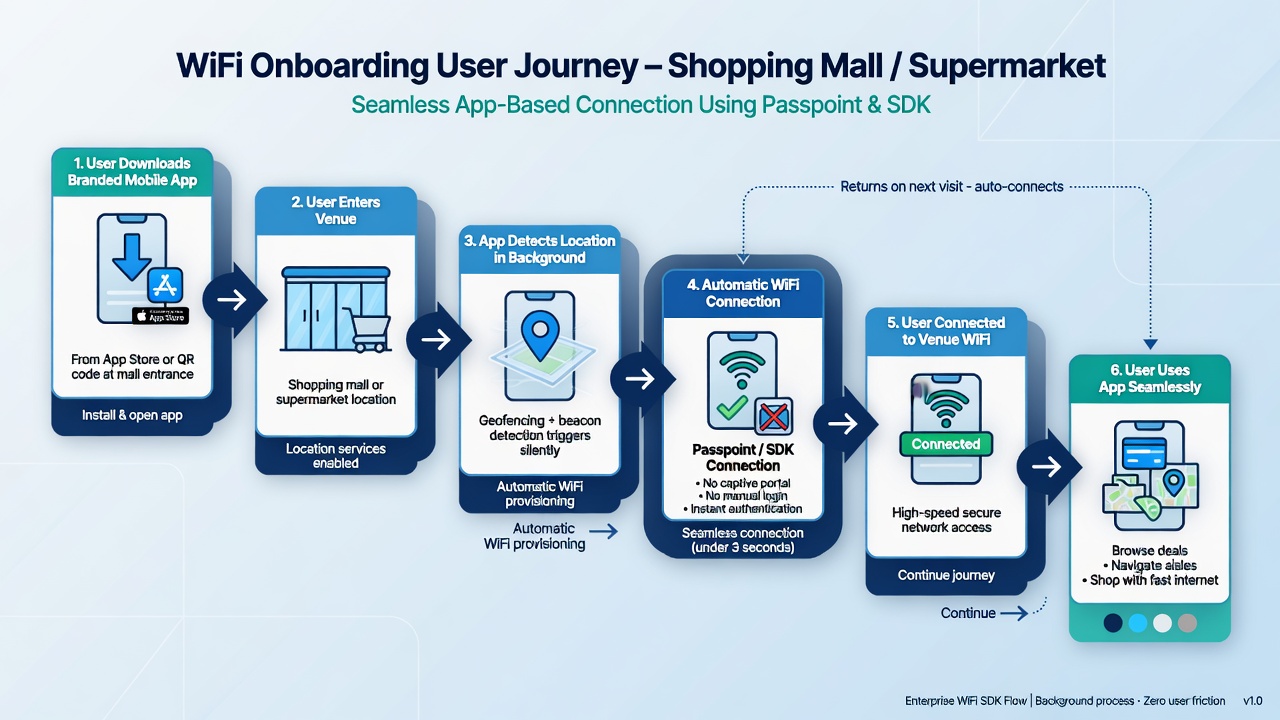
Typical user journey: Download branded app → Enter venue → App detects location → Automatic secure WiFi connection
When Should You Use App-Based WiFi Onboarding?
App-based solutions are not a universal replacement for Passpoint or certificate-based methods but excel in specific scenarios:
Ideal Use Cases
- Retail and public venues with branded apps — Shopping malls, supermarkets, airports, and stadiums where users are encouraged to download a loyalty or service app. The app can trigger location-based offers the moment WiFi connects.
- High BYOD or guest-heavy environments — Where pre-provisioning certificates at scale is impractical, but app downloads can be incentivized (e.g., via QR codes, signage, or promotions at entry).
- Marketing and data-driven experiences — Organizations that want rich first-party data (visit frequency, dwell time, consent) collected inside the app rather than through a generic portal.
- Transitional or hybrid strategies — While building out full identity infrastructure for native EAP-TLS or widespread Passpoint profiles. App-based can deliver immediate wins for app users.
- MDU (Multi-Dwelling Unit) or campus environments — Where residents/students already use a property or university app for other services.
When It May Not Be the Best Choice
- Low app adoption rates or resistance to downloading another app.
- Environments requiring zero user action and maximum device compatibility (pure Passpoint shines here).
- Strict security requirements where app-level permissions or background location tracking raise privacy concerns.
- Very large-scale enterprise with mature MDM/identity systems better suited to certificate-based onboarding.
Leading platforms often combine app-based onboarding with traditional captive portals and Passpoint so that app users get the premium experience while others fall back to web flows.
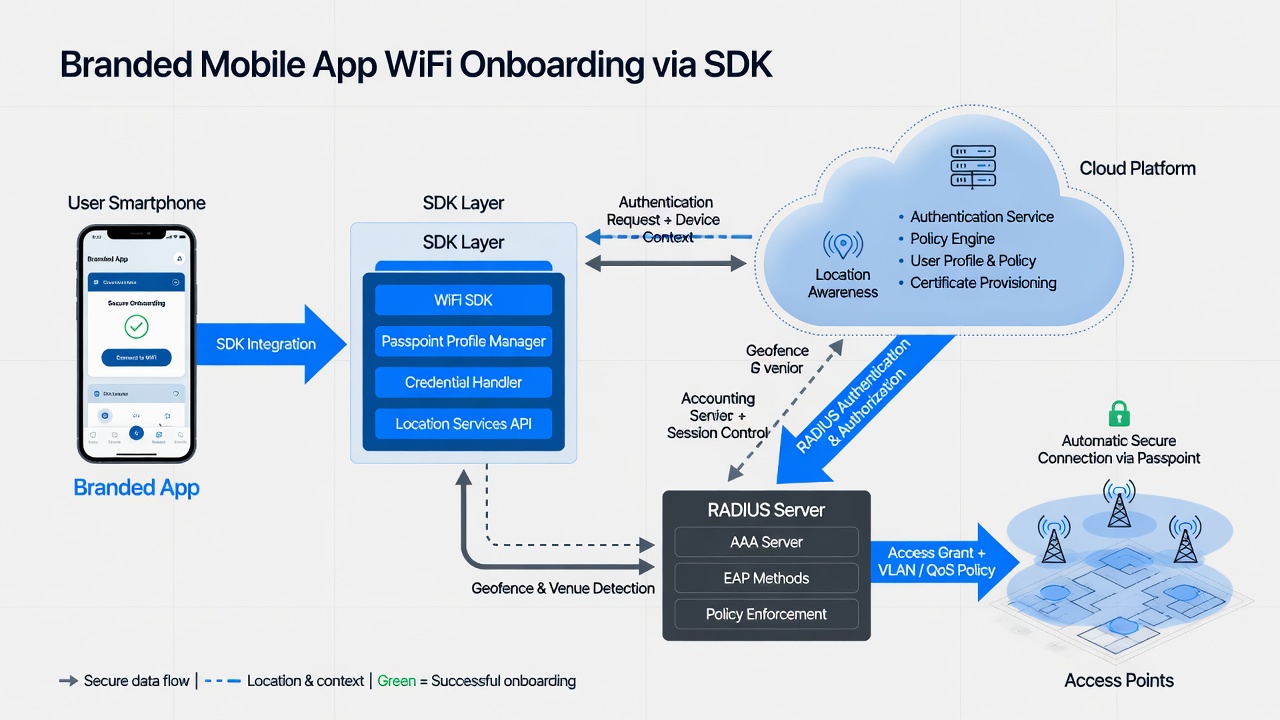
High-level architecture: Branded app with SDK communicates with the cloud platform for authentication, policy enforcement, and location services before granting access via the WiFi infrastructure.
How Branded App Onboarding Solutions Work
Leading platforms provide cloud-native WiFi access solutions that unify guest access, location analytics, and marketing capabilities. Their Mobile SDKs are the key enablers for branded app experiences.
User Perspective: Getting Access Through the Branded App
- App Acquisition: Users are prompted (via signage, QR codes, website, in-venue promotions, or app store) to download the organization's branded mobile app (iOS or Android).
- Initial Setup & Permissions: Upon first launch or relevant screen, the app requests necessary permissions (location, WiFi, notifications). The SDK can handle background location detection even when the app is not actively in use.
- Venue Detection: When the user enters the geofenced area (shopping mall, supermarket, etc.), the SDK uses a combination of GPS, WiFi scanning, and/or beacons to recognize proximity to the venue.
- Automatic Connection: The SDK communicates with the cloud platform. Using Passpoint technology (or other secure methods), the app triggers seamless association to the venue's WiFi network. No manual SSID selection and no captive portal for app-authenticated users.
- Seamless Access & Engagement: The user is instantly connected to secure, high-speed WiFi. The app can now deliver personalized content, offers, or services based on real-time location data and visit history. Consent for marketing can be collected natively inside the app.
- Ongoing Experience: On subsequent visits, the process repeats automatically. The app can also support features like iPSK (individual Pre-Shared Keys) or other fallback methods if needed.
This flow turns WiFi from a utility into a branded, data-rich engagement channel while dramatically reducing user friction compared to traditional portals.
How the Solution Works (Backend & Technical Flow)
These platforms operate as cloud-based systems that sit between the organization's WiFi infrastructure (access points, controllers) and the end-user devices/apps.
- WiFi Infrastructure Layer: Access points and controllers are configured to use the platform as the RADIUS server for authentication and accounting (standard protocols).
- Cloud Platform: Handles policy enforcement, user/device profiling, location analytics (via the SDK), insights, and integration with marketing/CRM systems. It supports multiple access methods: captive portal (customizable and branded), Passpoint (for automatic connections), PPSK/iPSK, and SDK-driven app onboarding.
- Mobile SDK Layer: Integrated by the brand's development team into their existing iOS/Android app. The SDK provides APIs for automatic WiFi connection, background location awareness, and secure credential handling. It can leverage Passpoint profiles pushed or activated through the platform.
- Authentication & Policy: When the app detects the venue, it signals the cloud platform (often using the user's existing app session or anonymous device identifiers). The platform validates against policies and instructs the WiFi network to grant access. For Passpoint-enabled networks, this can happen with zero user interaction.
- Data & Analytics Loop: Connection events, dwell time, and (with consent) user behavior flow back to the platform for real-time segmentation and triggered actions inside the app.
The result is a hybrid environment: app users enjoy premium automatic access; non-app users can still connect via a traditional (but customizable) captive portal.
Technical Deep Dive for Engineers
SDK Integration: Developers add the platform's Mobile SDK to their app. It typically requires configuration with venue identifiers, API keys, and permission handling. The SDK exposes methods to check connectivity status, trigger connections, and receive location events.
Passpoint & Automatic Connection: The platform can provision or activate Passpoint profiles on supported devices via the SDK. This enables the device to automatically discover and join the correct SSID with enterprise-grade security (usually WPA3-Enterprise or equivalent) without user intervention.
Location Awareness: Combines device GPS, WiFi scanning, and optional beacon technology. The SDK can wake or notify the app even when backgrounded, which is powerful for triggering context-aware experiences upon arrival.
Security Model: Authentication is tied to the app's identity context rather than (or in addition to) device certificates. The platform enforces per-user or per-session policies. Data collection respects consent gathered inside the app. However, organizations must still manage app permissions, updates, and potential privacy regulations (GDPR, CCPA, etc.).
Network & RADIUS Integration: Standard RADIUS (with possible extensions) is used between APs/controllers and the cloud platform. This allows the platform to dynamically authorize access based on app-driven signals.
Fallbacks & Hybrid Modes: Leading platforms support a mix of onboarding methods so organizations can serve both app users and non-app users from the same infrastructure.
Scalability & Operations: Being cloud-native, the platform handles large volumes of connections and provides analytics dashboards. Integration with existing WiFi hardware (Cisco, Aruba, Ruckus, etc.) is common via standard protocols.
Security, Privacy & Compliance Considerations
For Executives: App-based methods can improve the user experience and data quality, but they shift some responsibility to the mobile app (permissions, updates, user consent). Ensure your app privacy policy and consent flows are robust. The platform itself is designed with enterprise-grade security in mind.
For Technical Teams: Review how the SDK handles credentials (they should never be stored insecurely), background location usage (battery and privacy implications), and certificate or profile management if using Passpoint. Test thoroughly across iOS/Android versions and with MAC randomization behaviors. Combine with network segmentation and monitoring.
Comparison to Other Onboarding Methods
App-based solutions excel when you already have or are investing in a branded app and want to keep users inside that experience. It is often faster to deploy for app-centric organizations than full device certificate infrastructure.
Compared to native Passpoint/EAP-TLS, it may involve more ongoing app maintenance and dependency on users having the app installed and permissions granted. However, it provides richer contextual data and marketing hooks that pure device-native methods typically do not.
Many organizations run hybrid environments: app users get the premium automatic experience, while others use captive portals or self-service Passpoint profiles.
If app adoption is already part of your digital strategy, SDK-powered app-based onboarding (or similar solutions) can deliver immediate, branded wins. For environments prioritizing zero-friction across all devices without requiring an app, explore our guide on Passpoint WiFi (Hotspot 2.0) and EAP-TLS with PKIaaS.
Ready to evaluate options for your specific venues and user base? Request a free consultation to discuss fit, architecture, and rollout considerations.