Benefits of PKI as a Service for Enterprise Wi-Fi Deployments
PKIaaS shifts certificate management from expensive, complex on-premises operations to a predictable, automated service — delivering major cost savings, stronger security, and dramatically easier compliance, especially when enabling EAP-TLS on your existing Wi-Fi infrastructure.
Running an internal PKI for enterprise Wi-Fi is rarely a core competency, yet it carries significant hidden costs in hardware, specialized staff, ongoing operations, audits, and risk. PKI as a Service replaces that model with cloud-hosted, automated certificate issuance and lifecycle management — turning large capital and operational expenses into predictable OPEX while accelerating the move to secure, certificate-based authentication (EAP-TLS) and advanced capabilities like Passpoint with RCOI.
The cost benefits are often the most immediate and measurable, but the security and compliance advantages — particularly for Wi-Fi where shared passwords and weak auth create ongoing risk — are equally compelling. When combined with a dedicated onboarding layer (as covered in the recent Passpoint vs Traditional Wi-Fi and deploying PKIaaS articles), PKIaaS enables fast, scalable results on infrastructure you already own.
- • On-prem PKI for Wi-Fi carries heavy hidden costs: servers/HSMs, 1–2+ specialized FTEs, patching, audits, key ceremonies, and high risk of major incidents.
- • PKIaaS shifts the model from unpredictable CAPEX + ongoing overhead to predictable subscription pricing, freeing budget and staff for higher-value work.
- • The biggest cost wins often come from reduced staff time, avoided hardware refreshes, faster deployment, and lower helpdesk volume tied to better auth.
- • Security and compliance become dramatically easier — proper EAP-TLS (mutual authentication, strong revocation, no shared secrets) is the default rather than an exception.
- • PKIaaS works on top of your existing Wi-Fi infrastructure (cross-reference the Passpoint vs Traditional Wi-Fi article: most modern APs have supported the required features since ~2012).
- • Pairing PKIaaS with a dedicated onboarding solution unlocks advanced profile capabilities (e.g., RCOI for Passpoint) and makes “quick” deployment real for BYOD, guest, and staff populations.
- • For organizations facing 2026 CA migrations or scaling certificate auth, the move to PKIaaS is often one of the highest-ROI steps in modernizing Wi-Fi security.
The Real (and Often Hidden) Cost of Running Your Own PKI
Many teams initially look only at the servers or HSMs when evaluating internal PKI. The true total cost of ownership is much higher and more persistent:
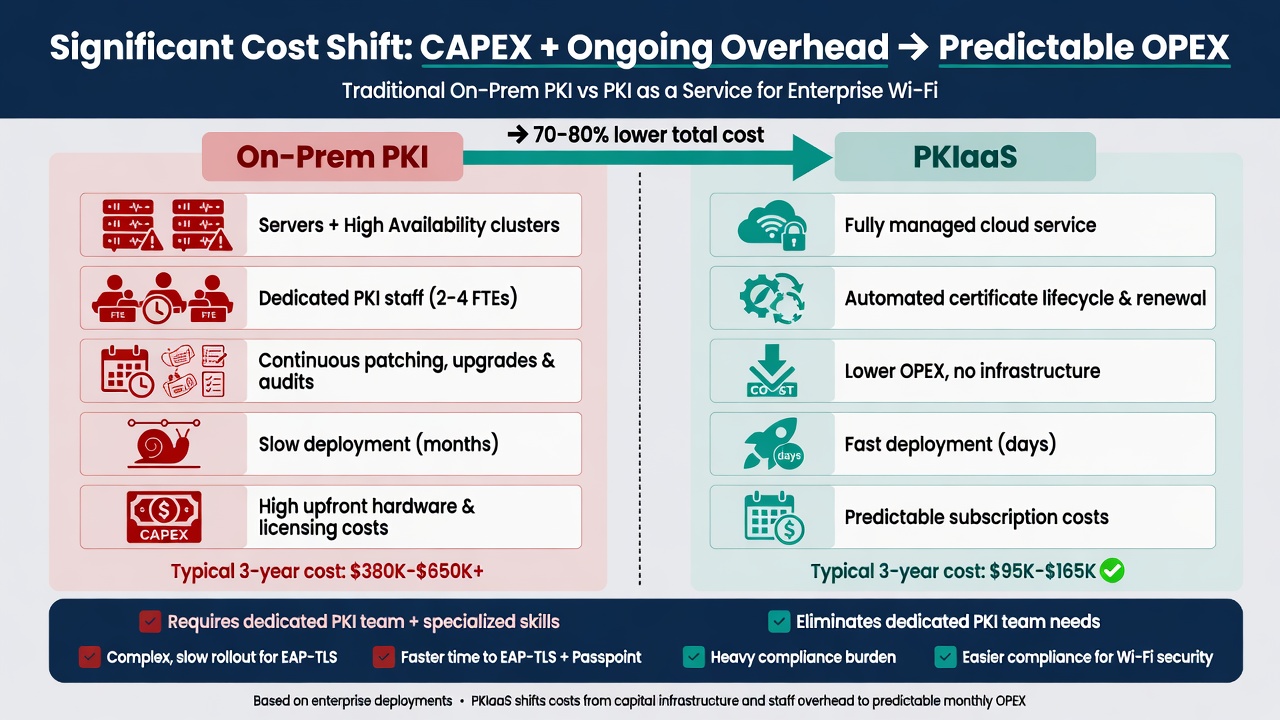
Typical cost profile shift when moving Wi-Fi certificate management to PKIaaS.
- Hardware and infrastructure — Production CAs need HSMs, redundant servers, secure facilities, disaster recovery, and regular refreshes.
- Specialized (and scarce) personnel — PKI expertise for policy, templates, revocation, key ceremonies, and integrations is expensive and hard to retain.
- Ongoing operations — Patching, monitoring, backups, high-availability configurations, and regular audits consume ongoing budget and time.
- Risk and incident costs — A compromised or poorly managed internal CA can lead to widespread credential or access issues. Remediation, forensics, and lost trust are expensive.
- Opportunity cost — Your security and network teams spend cycles on “plumbing” instead of Wi-Fi policy, identity strategy, user experience, or zero-trust initiatives.
The Clear Cost Benefits of PKIaaS
Moving certificate management for Wi-Fi to a managed service typically produces several direct and measurable savings:
- Eliminate or greatly reduce CAPEX and hardware refreshes — No more on-prem CA servers, HSMs, or the facilities to house them.
- Predictable OPEX — Subscription pricing replaces lumpy capital spend and hard-to-forecast staff costs.
- Lower staff overhead — Reduce or reallocate the 1–2+ FTEs (or equivalent contractor time) previously spent on PKI operations.
- Faster time-to-value — Weeks or months instead of the long internal projects required to stand up a secure, auditable on-prem PKI.
- Reduced risk-related costs — Reputable providers invest in controls, audits, and processes that are difficult for most internal teams to match, lowering the probability and impact of incidents.
- Indirect savings via better Wi-Fi auth — Easier path to EAP-TLS reduces password-related helpdesk tickets and security incidents (see the dedicated helpdesk reduction article).
Security and Compliance Advantages (Especially for Wi-Fi EAP-TLS)
Beyond pure cost, PKIaaS makes strong security the easier default:
- Built-in support for modern, secure enrollment protocols (SCEP, EST) and strong revocation.
- Easier implementation of proper EAP-TLS for Wi-Fi (mutual authentication, per-device or per-user identities, no shared secrets or weak PEAP-MSCHAPv2).
- Simplified compliance for regulations that require strong authentication and certificate lifecycle controls (HIPAA, NIST, etc.). Audits become about configuration and usage rather than proving you can securely run a CA.
- Better integration with identity providers for automated issuance, policy enforcement, and revocation tied to user/device status.
- Support for advanced Wi-Fi use cases such as Passpoint profiles with RCOI (see the recent Passpoint vs Traditional Wi-Fi article for how this works on existing infrastructure).
When you no longer have to maintain the CA infrastructure yourself, achieving and proving strong Wi-Fi security becomes far more achievable.
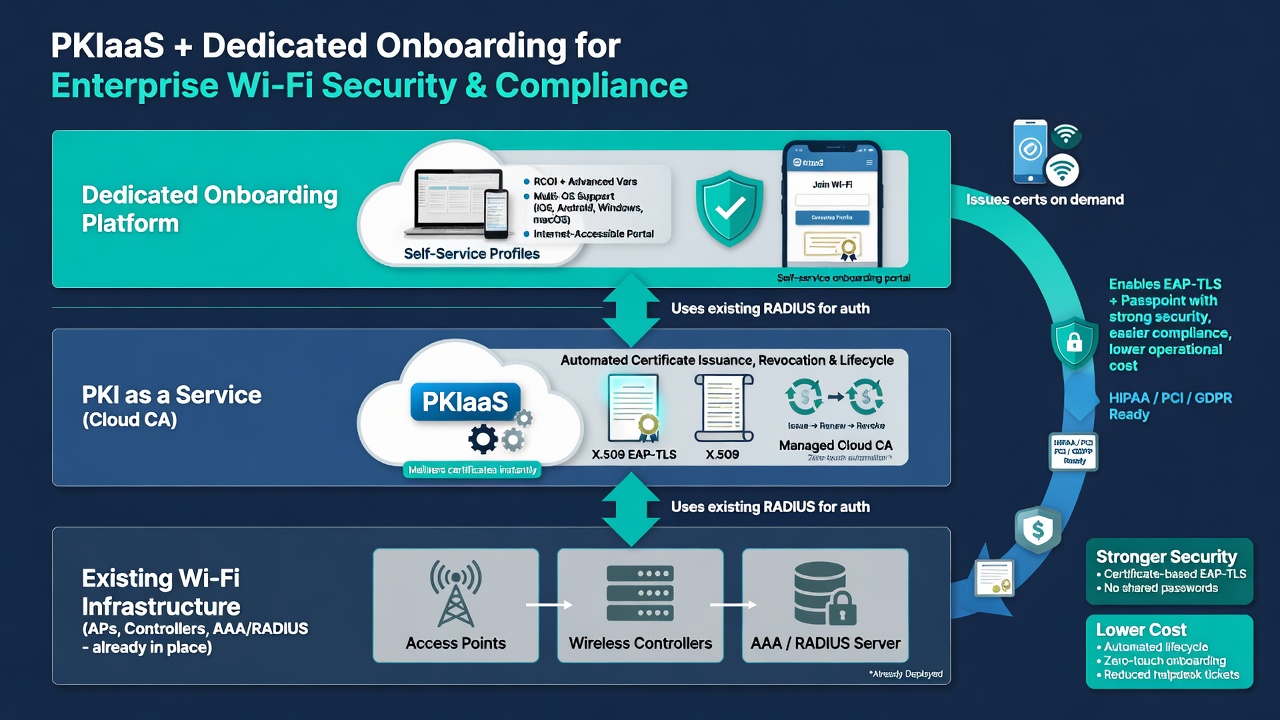
PKIaaS provides the secure cert backend. When paired with dedicated onboarding, it delivers advanced, policy-rich Wi-Fi authentication on infrastructure you already own.
Operational and Strategic Benefits
In addition to cost and security:
- Your teams focus on Wi-Fi strategy, user experience, and integration with identity/zero-trust initiatives rather than running certificate authority plumbing.
- Deployment of certificate-based Wi-Fi (and advanced features like Passpoint) happens much faster, supporting business initiatives that depend on modern access.
- Scaling for large or high-churn environments (universities, healthcare, contractors) becomes realistic without proportional growth in PKI staff.
- Future changes (new use cases, 2026 CA migrations, tighter compliance requirements) are handled through configuration and provider updates rather than major internal projects.
For Technical Teams: What to Prioritize
When evaluating or deploying PKIaaS for Wi-Fi:
- Confirm strong, native support for the enrollment protocols your devices and MDMs actually use (SCEP/EST are table stakes; look for easy high-volume automation).
- Evaluate how easily you can create Wi-Fi-specific templates with the right key usages, extensions, and (for Passpoint) the ability to incorporate RCOI and other advanced elements via the onboarding layer.
- Test identity integration quality — the smoother the tie to Entra ID, Okta, Google Workspace, or on-prem AD, the faster and more secure your issuance and revocation will be.
- Validate SLAs around issuance speed and revocation propagation, especially for high-volume or time-sensitive scenarios.
- Look for transparent audit reports, compliance certifications, and clear documentation so your own audits become simpler rather than harder.
- Plan the handoff between PKIaaS (certs) and your dedicated onboarding solution (full profiles with advanced Wi-Fi policy) early — this is where most of the “quick deployment” value is realized.
If cost, security posture, or compliance burden around certificate management for Wi-Fi is a current pain point, PKIaaS is frequently one of the highest-ROI moves available — especially when paired with the dedicated onboarding capabilities discussed in the related articles. Request a consultation and we can review your current PKI approach, Wi-Fi/AAA environment, and realistic cost/security timeline for a move to managed services.