Pairing Modern Onboarding Platforms with Enterprise AAA for Scalable EAP-TLS in University BYOD Environments
Why large campuses are discovering that the best certificate-based Wi-Fi results come from letting each tool do what it was built for.
Moving to EAP-TLS certificate authentication is the right long-term decision for security, compliance, and user experience in any large ecosystem — especially universities with tens of thousands of personal devices. However, enterprise AAA platforms like Cisco ISE, while excellent at policy, authorization, and integration with identity stores, were not primarily designed as delightful, zero-touch onboarding experiences for consumer BYOD at campus scale.
Dedicated cloud onboarding and dynamic PKI platforms exist specifically to close that gap: beautiful guided enrollment flows that work across every major OS and device model, automated certificate issuance and renewal, and supplicant profile management. Crucially, the enrollment portal and wizards are accessible over the public internet from anywhere (home, coffee shop, before students even arrive on campus) or via a simple campus redirect — users do not need to already be connected to the university network or be physically on site. When you pair the two — letting the specialized onboarding layer handle discovery, trust, enrollment, and lifecycle while the AAA platform handles the actual authentication decisions and rich policy enforcement — you get the best of both worlds without forcing either tool outside its sweet spot.
The result for universities is dramatically lower helpdesk volume, higher successful onboarding rates across iOS/Android/Windows/macOS/ChromeOS, stronger security posture, and an experience that actually feels modern to students and faculty.
- • Pure AAA tools like Cisco ISE excel at policy and enforcement but create high friction and support burden when used as the primary BYOD certificate onboarding mechanism at university scale.
- • Full EAP-TLS involves far more than “turn on EAP-TLS in the RADIUS server”: certificate generation, chain of trust, enrollment protocols, per-OS supplicant profiles, revocation checking, and ongoing lifecycle management across thousands of consumer devices.
- • Android, in particular, remains painful for private CA trust and profile installation without a dedicated onboarding client — a common source of “it works on iPhone but not my Android” tickets.
- • Specialized onboarding platforms are purpose-built for exactly this problem: multi-OS wizards or silent enrollment, SCEP/EST proxying or dynamic PKI, profile push, and renewal automation — while integrating cleanly as a front-end to your existing AAA infrastructure.
- • The pairing model lets ISE (or ClearPass, Aruba, etc.) do what it does best (authorization, dynamic segmentation, identity correlation) while the onboarding layer removes the enrollment nightmare.
- • Universities see the highest ROI when students and faculty can complete secure onboarding from anywhere, on any device, with almost zero IT involvement after initial setup.
- • This is not “rip and replace” — it is a complementary architecture that protects your existing AAA investment and accelerates time-to-value for certificate-based authentication.
- • At smaller scales (a few thousand users), comprehensive dedicated onboarding solutions can cost $15–$30+ per user per year. At true large-university scale (50,000–100,000 devices), volume and education discounts typically bring the cost of the specialized onboarding/PKI layer down to $2–$6 per user per year — a small fraction of overall Wi-Fi spend that is frequently offset by major reductions in support tickets and faster secure access for everyone.
What Actually Goes Into a Production EAP-TLS Deployment
EAP-TLS is cryptographically strong mutual authentication: the device proves possession of a private key tied to a certificate issued by a trusted CA, and the network proves it holds the private key for its own server certificate. No passwords cross the air. Done correctly, it is excellent. But “done correctly” at scale for BYOD is where most organizations underestimate the work.
The Full Chain of Responsibilities
- PKI Foundations: Root CA (often offline), issuing intermediate CAs, certificate policies and templates, name constraints or SAN requirements, validity periods, key usage and extended key usage settings.
- Enrollment: How does a device request and receive a certificate? Manual CSR + admin approval? SCEP? EST? ACME? MDM push? Each has trade-offs in security, UX, and operational load.
- Trust & Validation: Every device must trust the server certificate (or the issuing chain). The RADIUS server must validate the client certificate (chain, revocation status via CRL or OCSP, possibly additional identity checks).
- Supplicant Configuration: Each OS has its own way of storing certificates and configuring 802.1X. iOS uses profiles (or MDM). Android has historically been the most fragmented. Windows uses the certificate store + native or third-party supplicant. macOS is usually smoother but still requires profile or manual work. ChromeOS and Linux add more variety.
- Revocation & Lifecycle: When a student graduates, loses a phone, or a device is compromised, how fast can you revoke? How do you handle renewal before expiry without breaking connectivity? Who owns the automation?
- Monitoring & Support: You need visibility into failure modes (bad chain, expired cert, revocation check timeout, supplicant misconfig) so helpdesk can actually help instead of guessing.
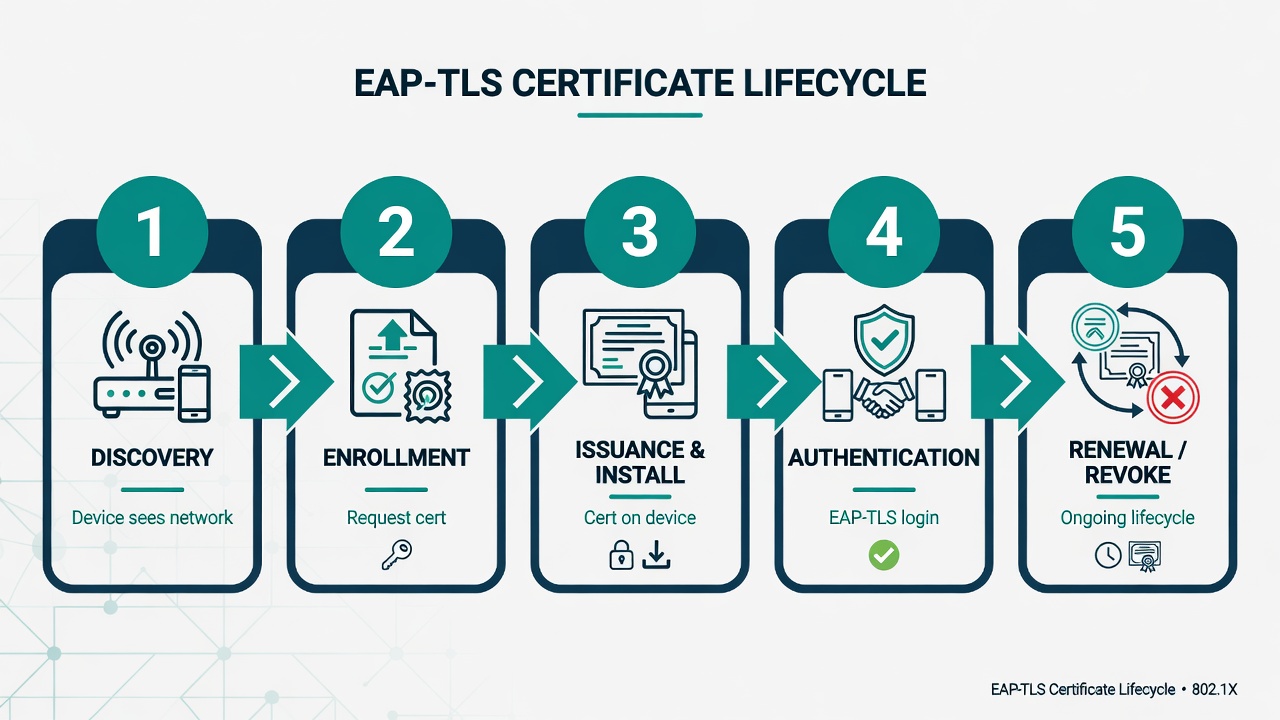
The essential certificate lifecycle steps that must be handled reliably at campus BYOD scale (simplified view).
The Honest Limitations of Using Cisco ISE (and Similar AAA Platforms) Alone for University BYOD
Cisco ISE is a powerful policy engine. It is very good at making sophisticated authorization decisions once a device presents valid credentials. The problem for large BYOD environments is everything that happens before that successful authentication — and the ongoing care and feeding of certificates across devices the university does not own or manage.
Common Pain Points Reported by Campus Teams
- Onboarding UX is dated and manual for most consumer devices. The My Devices portal and BYOD flows often require users to perform multiple steps, download files, install profiles, accept multiple prompts, and understand concepts like “CA trust” that most students and faculty have never encountered.
- Android remains disproportionately difficult. Importing a client certificate and trusting a private CA on a personal Android device without MDM or a good onboarding client is error-prone and varies wildly by manufacturer and OS version. This is one of the top sources of ongoing support tickets in many deployments.
- Pre-arrival and off-campus (internet) onboarding is weak or nonexistent. Many AAA-only flows require users to already be on a university SSID or physically on campus. Students want (and expect) to complete secure setup from home or anywhere with internet before they arrive.
- Renewal and revocation are afterthoughts for most users. Certificates expire. Devices get lost or sold. Without automated renewal that is invisible to the user and fast revocation paths, you trade password resets for “my Wi-Fi just stopped working” tickets.
- Support burden stays high even after “go live.” Every new OS release, every major Android update, every student with a new phone model can surface edge cases. The AAA platform itself provides limited guided remediation for the end user.
- Scale and diversity expose the gaps. 15,000–40,000+ unique personal devices with high annual churn (graduations, new admits, visitors) is a completely different problem than onboarding a few hundred corporate laptops with MDM.
These are not failures of ISE as an AAA server. They are the natural result of asking a policy and enforcement platform to also be a consumer-grade, cross-platform, self-service certificate enrollment and lifecycle system.
Why Pairing a Specialized Onboarding Layer with Your Existing AAA Makes Perfect Sense
Modern cloud onboarding and dynamic PKI platforms were purpose-built for the exact problem universities face: getting certificates onto every conceivable personal device with minimal user friction and minimal IT staff time, while still using the organization’s chosen AAA infrastructure for the actual authentication and policy decisions.
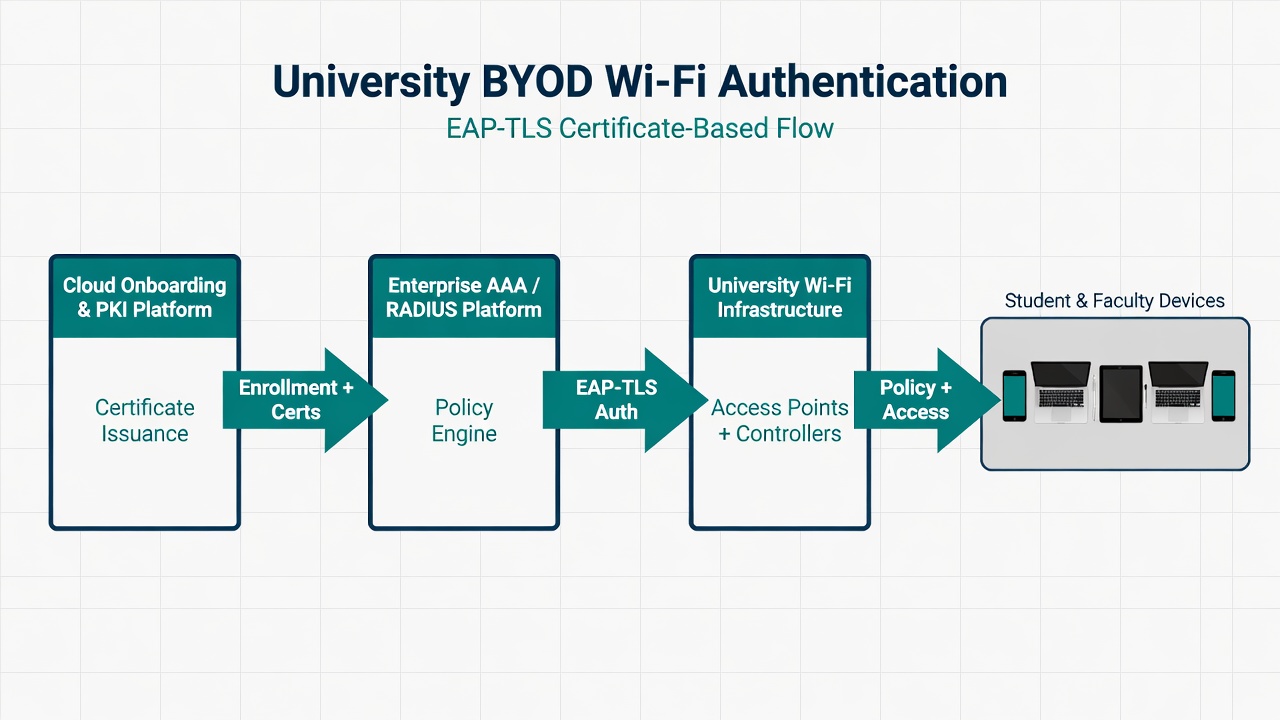
Recommended hybrid model (simplified view): the specialized onboarding platform handles enrollment and device configuration; the enterprise AAA platform handles authentication, authorization, and policy enforcement.
How the Division of Labor Works
- Onboarding platform responsibilities: Device discovery and trust bootstrap that works over the public internet (open/redirect SSID or direct link from anywhere), guided or silent multi-OS enrollment wizards, CSR/SCEP/EST to your CA or managed PKI, secure profile + certificate installation, user guidance, automated renewal, and revocation signaling.
- AAA platform responsibilities: EAP-TLS termination and certificate validation (chain, revocation status, any additional checks), integration with your identity provider or directory for user-to-certificate correlation, rich authorization (dynamic VLAN, ACLs, SGTs/TrustSec, role-based policy), accounting and live logs, guest and contractor flows if needed.
- Shared or coordinated: The CA trust chain (root/intermediates published to both sides), certificate attributes or SANs used for identity, revocation infrastructure (CRL distribution points or OCSP responders reachable by the AAA), any posture or additional context passed via RADIUS attributes.
This is not a rip-and-replace of your AAA investment. It is the addition of a specialized front-end layer whose entire reason for existing is to make the “getting the certificate on the device correctly” problem boring and reliable.

The end goal for campus BYOD: students and faculty simply connect — securely, automatically, and reliably — on whatever personal devices they actually own.
Device and OS Reality: Why Broad Support Matters
Universities cannot dictate device types. The mix includes flagships, budget phones, personal Macs, Windows machines, Chromebooks, tablets, and more — with new models and OS versions every semester.
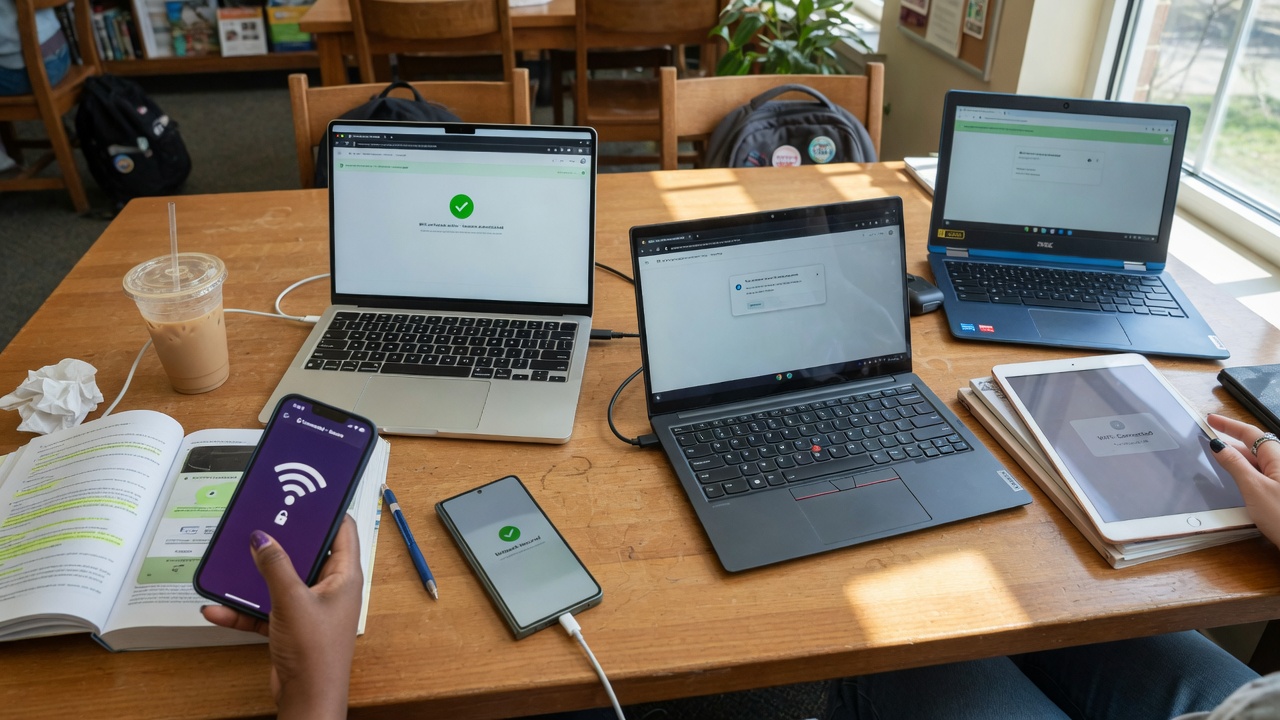
Diverse personal devices in real university use: the dedicated onboarding platform supports reliable certificate enrollment and secure Wi-Fi across the full spectrum of consumer hardware and operating systems.
Specialized onboarding platforms have spent years perfecting silent or guided flows, per-OS profiles, MAC randomization handling, and recovery for exactly these edge cases — work that is expensive and time-consuming to replicate in-house or bolt onto a general AAA tool.
Cost Considerations: What a Dedicated Onboarding Solution Typically Costs
One of the first questions executives ask is “what does this actually cost?” Dedicated cloud onboarding + dynamic PKI platforms are priced as SaaS subscriptions (quote-based, per-user or per-active-user, not per device). Pricing varies by volume, contract length, support tier, and whether you need the full stack or just the enrollment/PKI layer on top of your existing AAA.
At smaller scales (1,000–5,000 users), comprehensive solutions with multi-OS enrollment, certificate lifecycle, and support often land in the $15–$30+ per user per year range (matching real quotes for mid-sized deployments, especially shorter-term or premium bundles).
At true university scale (50,000–100,000 devices), volume discounts, education pricing, and multi-year deals typically bring the specialized onboarding/PKI layer down to $2–$6 per user per year (sometimes lower), particularly when added on top of an existing AAA like Cisco ISE rather than buying a full replacement stack. Expect a one-time implementation fee of $10k–$40k+ in year one.
ROI is usually strong via helpdesk reduction (many campuses see 40–70% fewer Wi-Fi tickets). The layer often pays for itself in 12–18 months.
Blended ranges for the dedicated onboarding/PKI layer (2026 market, quote-based):
| Scale | Typical Cost (per user/year) | Notes |
|---|---|---|
| Small / Mid (< 5,000 users) | $12 – $30+ | Full bundle or shorter contracts; matches real mid-sized quotes |
| Large Campus (15k – 50k users) | $4 – $10 | Volume discounts + education pricing |
| Very Large (50k – 100k+ devices) | $2 – $6 | Significant discounts; usually licensed by headcount, not every device |
| One-time Implementation | $10k – $40k+ | Year one only (profiles, IdP integration, testing, go-live) |
If you already have strong AAA and only need the enrollment/PKI front-end, rates can be lower (no duplicate RADIUS cost). Premium support or short contracts push the high end. Very large education deals deliver the best per-unit economics.
Biggest variables for budgeting: per-named-user vs. device multiplicity, number of custom OS profiles/integrations needed, full stack vs. layer-only, and support level during peak seasons (orientation, move-in). At 50k–100k device scale the per-unit cost improves dramatically versus a few thousand users.
For Technical Teams: Integration Patterns and Practical Considerations
When evaluating or designing this paired architecture, focus on these integration points and operational realities.
RADIUS / AAA Side
- Trust the client certificate issuing CA(s) in the AAA (add root + intermediates to the certificate authentication profile).
- Enable EAP-TLS and tune validation (revocation checking via CRL/OCSP, timeouts for scale).
- Map certificate attributes (SAN/subject) to your identity store for authorization, or use it purely for device identity.
- Plan CoA support if you need fast reaction to revocations or policy changes.
Onboarding / PKI Side
- Enrollment gateway (SCEP/EST) or managed CA that federates with your identity provider during onboarding.
- Generate correct per-OS Wi-Fi profiles that include trusted server certificates (no user prompts for the RADIUS cert).
- Pre-onboarding that works over the public internet: open SSID redirect, direct links, or QR codes so users can finish everything from home or anywhere before arrival.
- Automated, low-friction renewal before expiry (no need to be on the network at that moment).
Revocation and Lifecycle at Scale
CRL/OCSP reachability and performance matter at tens of thousands of certificates. Many teams publish from the onboarding platform and use short validity periods (e.g. 1 year) plus automated renewal for easier management in high-churn environments.
Common Integration Gotchas
- Certificate policy or SAN mismatches between the enrollment system and AAA expectations.
- Revocation check timeouts or unreachable CRL/OCSP causing valid devices to fail.
- Android VPN/private DNS or MAC randomization breaking enrollment flows.
- Policy decisions on per-person vs. per-device certificates when students have multiple devices.
- Need for a realistic lab covering the actual OS versions your population runs today.
If you run (or plan to run) Cisco ISE or similar AAA and are struggling with BYOD certificate adoption at scale, the highest-leverage move is usually adding a purpose-built onboarding + certificate lifecycle layer in front of it — rather than ripping out your AAA. The hybrid model is well proven at large campuses and delivers big reductions in support volume plus true “from anywhere” self-service enrollment.
Bottom Line for Both Audiences
EAP-TLS is the right long-term destination for security and operations in large, heterogeneous environments. The organizations that succeed fastest pair a strong AAA/policy engine with a specialized onboarding + PKI platform that works over the public internet (anywhere, before arrival) or on campus, and let each tool do what it does best.