Helpdesk Reduction with EAP-TLS Certificate Onboarding
How moving to certificate-based authentication, paired with the right onboarding tooling, transforms support volume in large and complex environments.
EAP-TLS with proper self-service onboarding typically delivers 65-85% sustained reductions in Wi-Fi-related helpdesk tickets by eliminating password resets, manual 802.1X configuration, and onboarding friction. Industry data shows password reset tickets alone can cost organizations $15–$70 each; for mid-sized environments doing periodic resets, this can exceed $100k–$300k+ annually in fully loaded support costs. The savings are real, but they depend heavily on implementation — simply enabling EAP-TLS in your RADIUS server is rarely enough for large BYOD populations.
As covered in our recent guide on pairing dedicated onboarding platforms with enterprise AAA solutions for university-scale BYOD, the biggest ticket drivers come from the enrollment and lifecycle experience, not the authentication protocol itself. Dedicated tools that work over the public internet are usually required to capture the full benefit at scale.
- • Password resets and manual configuration account for the majority of Wi-Fi tickets in password or PEAP-based environments — often 60-70% combined.
- • Industry estimates put the fully-loaded cost of a single password reset or onboarding support ticket at $15–$70; these add up quickly in environments with high user churn or seasonal onboarding (higher education, K-12, contractors).
- • EAP-TLS removes recurring credential problems, but without internet-accessible self-service enrollment and profile automation, the initial deployment and any re-enrollment events (such as 2026 CA migrations) can temporarily increase tickets.
- • Dedicated onboarding platforms (paired with your existing AAA like Cisco ISE) are the practical enabler for large-scale reductions — they handle the user experience layer that pure RADIUS/AAA tools were not primarily built to optimize.
- • Higher education and similar high-BYO D environments see some of the largest gains because August/September onboarding chaos with shared passwords or manual profiles is eliminated.
- • The financial case is usually clear within 12 months when fully-loaded helpdesk costs, IT productivity, and user satisfaction are considered together.
- • Sustained results require ongoing monitoring of onboarding success rates and integration with identity systems for automated revocation and updates.
Where Wi-Fi Tickets Actually Come From
Multiple analyses of enterprise and education support data (including insights aligned with vendor reports from organizations focused on certificate authentication) show a remarkably consistent pattern before EAP-TLS adoption:
- 40-50%+ — Password resets, “I forgot the Wi-Fi password,” lockouts, and credential sharing.
- 25-30% — Device-specific onboarding and 802.1X configuration failures (especially painful on Android and during BYOD influxes).
- 15-20% — Intermittent issues from cached bad credentials or expired profiles.
- 10-15% — Guest/contractor access problems, wrong SSID connections, and portal friction.
In higher education and K-12, the seasonal spike is particularly brutal: thousands of students arriving with new devices, leading to helpdesks buried in work during the first weeks of term.
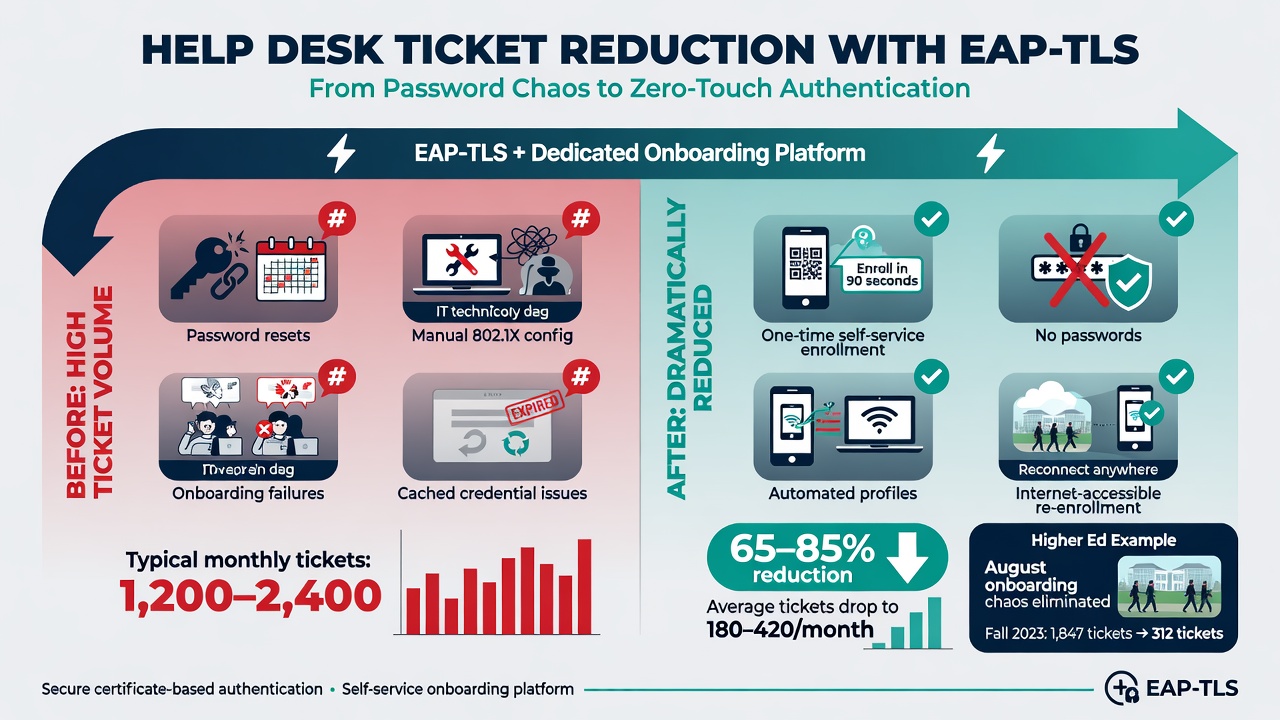
Common ticket drivers before and after moving to EAP-TLS with proper self-service onboarding tooling.
The Levers That Actually Drive Reduction
EAP-TLS combined with modern onboarding directly attacks the root causes:
- Eliminates recurring shared secrets — No passwords to forget, share, or reset. Certificates are per-device or per-user and can be revoked instantly.
- Removes or minimizes captive portals for supported devices — Passpoint/OpenRoaming or properly provisioned EAP-TLS profiles allow automatic, secure connection with no user interaction on modern clients.
- Automates and standardizes profile delivery — Self-service flows that work over the internet (not just on-campus) for BYOD, with guided steps across iOS, Android, Windows, macOS, and ChromeOS.
- Enables reliable re-enrollment at scale — Critical for events like 2026 RADIUS CA migrations or device refreshes, where poor tooling would otherwise create a new wave of tickets.
Real-World Impact (Aligned with Industry Reports)
Organizations that implement EAP-TLS with dedicated self-service onboarding platforms (rather than relying solely on native AAA portals) commonly report:
- 65–85% sustained drop in Wi-Fi-related tickets.
- Significant reduction in seasonal onboarding chaos in education (e.g., eliminating the “August helpdesk nightmare” described in higher-ed deployments).
- IT staff time freed from repetitive resets and configuration support — often several FTE hours per week per thousand users redirected to higher-value work.
- Improved user satisfaction and reduced shadow IT (people bypassing the network entirely).
These align with vendor-reported outcomes from certificate-focused solutions emphasizing automated BYOD enrollment: manual configuration is replaced by guided self-service that completes in minutes without IT intervention.
Honest Limitations and Why Dedicated Onboarding Matters
Turning on EAP-TLS in your existing AAA platform (Cisco ISE, ClearPass, etc.) is necessary but not sufficient for large BYOD environments. Pure native portals often require users to already be on a specific network, involve multiple manual steps per device/OS, and provide poor recovery options. This is exactly why the recent article on pairing dedicated onboarding platforms with enterprise AAA for university BYOD environments emphasizes the complementary role of specialized tools.
Without an internet-accessible, guided, multi-OS self-service layer that can handle initial enrollment, re-enrollment (including during CA migrations), and monitoring of success rates, many of the promised ticket reductions fail to materialize or are temporary. The authentication protocol delivers the security; the onboarding experience delivers the operational relief.
Key implementation factors for maximum and sustained reduction:
- Ensure the onboarding platform works over the public internet for pre-arrival and remote re-enrollment (critical for the 2026 CA migration scenarios discussed in our recent dedicated article).
- Integrate with your identity provider for automated user validation and revocation.
- Monitor onboarding success/failure rates in real time and have clear escalation paths.
- Test thoroughly with your actual device mix, including aggressive MAC randomization and older OS versions common in BYOD.
- Export logs and correlate Wi-Fi events with broader service desk and identity data for continuous improvement.
- Plan dual-trust periods during any CA changes so the transition itself does not spike tickets.
Integration with your existing AAA remains the authentication and policy engine — the dedicated layer simply removes the enrollment friction that generates the tickets.
For deeper context on why dedicated onboarding platforms are typically required to achieve these helpdesk outcomes alongside your existing AAA (especially at university scale), see our recent article Pairing Modern Onboarding Platforms with Enterprise AAA for Scalable BYOD EAP-TLS. The 2026 CA migration guide also highlights how poor tooling during re-enrollment events can undo prior gains.