Why Universities Are the Ultimate High-Density Passpoint Use Case
University campuses combine extreme density, extreme device diversity, and extreme onboarding events in ways few other environments do. A single residence hall or lecture complex can see thousands of devices attempting to connect within a short window. Students typically carry 5–7 devices each. Faculty and staff add more. Devices range from recent iPhones and Android flagships to older Windows laptops, Chromebooks, and a long tail of IoT and lab equipment.
Traditional approaches collapse under this load. Shared PSKs get posted on group chats. Captive portals create endless browser and certificate warning tickets. Manual or basic MDM profile pushes fail for large portions of the population or require users to already be on a compromised network. The helpdesk becomes a permanent feature of every semester start.

Mass BYOD environments like universities see the biggest gains: once profiles are provisioned, devices connect automatically and securely everywhere on campus.
Passpoint Has Been Ready for High-Density Since 2012
Passpoint (Hotspot 2.0) is the Wi-Fi Alliance certification program built on IEEE 802.11u. It enables devices to discover networks, evaluate policy, and authenticate automatically before association using ANQP (Access Network Query Protocol) carried over GAS frames.
The result is automatic selection of the correct secure network, followed by WPA2- or WPA3-Enterprise authentication — usually with EAP-TLS certificates. No captive portal. No password prompt. No manual SSID choice.
Because the standard is over a decade old, virtually all modern enterprise-grade access points and wireless LAN controllers from major vendors support the required features. Enabling them is typically a matter of turning on Hotspot 2.0 / Interworking / ANQP in the WLAN profile and advertising the correct RCOIs and realms.
- Move-in weekend and first day of classes become quiet for Wi-Fi support teams
- Students and faculty experience the network the way they experience cellular — it just works
- Ability to extend trusted campus access to partner cafes, libraries, or city areas via private RCOI federation
- Stronger security posture with per-device certificates and mutual authentication
- Cleaner RF because fewer devices are stuck scanning or failing to associate
Step 1: Enabling Passpoint on the Network
The network-side work is the most straightforward part for most institutions.
- Confirm hardware and firmware support. Check that your APs and controllers support 802.11u / Hotspot 2.0. Most deployments from the last 5–8 years do; a firmware update is often all that is required. No rip-and-replace of radios is typical.
- Enable the features on the target SSID(s). Turn on the Interworking / Hotspot 2.0 capability in your controller or cloud management platform. Configure the venue information, operator name, and domain name that will be advertised via ANQP.
- Advertise the correct RCOIs. This is the most important policy decision. RCOI (Roaming Consortium Organization Identifier) is the 5- or 10-byte value that tells devices “this network belongs to the group identified by this ID.” You will typically advertise the standard settlement-free OpenRoaming RCOI for broad compatibility plus any custom RCOI you define for your campus community or eduroam integration.
- Configure NAI realms and EAP methods. Declare the realms you will accept and prefer EAP-TLS (with server certificate trust info) for the strongest experience.
- Point the authenticator to your RADIUS infrastructure. Passpoint authentication still uses standard 802.1X/EAP to your existing AAA (Cisco ISE, ClearPass, Aruba, or cloud RADIUS). No change to the policy engine is usually required.
Passpoint Release 3 (R3) adds nice simplifications for high-density venues, including better single-SSID support and WPA3-Enterprise alignment.
Step 2: RCOI and Certificate Specifics in Passpoint Profiles
The real power (and the real complexity) of Passpoint lives in the client profile, not the access point.
A Passpoint profile installed on a device contains:
- The SSID or Home SP information the device should match
- The Roaming Consortium OI(s) — RCOI — the device should treat as trusted for automatic connection
- NAI Realm information
- Preferred EAP method (EAP-TLS is strongly preferred)
- Trusted root CA(s) for the RADIUS server certificate (mutual authentication)
- The client credential itself — ideally a per-device X.509 certificate for EAP-TLS
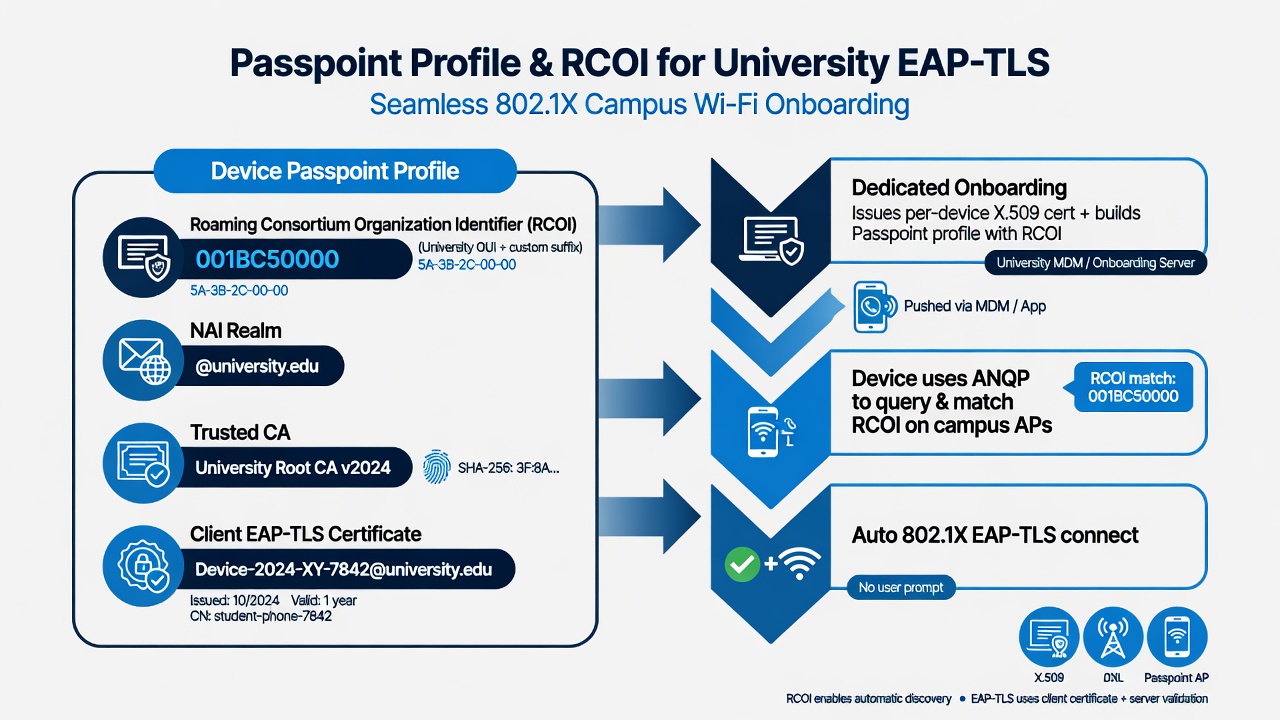
The Passpoint profile carries the RCOI and the EAP-TLS certificate. A dedicated onboarding solution builds and delivers this profile at scale for every device type.
RCOI is how you express policy at the discovery layer. A university might use one RCOI for all campus-owned and student devices, a second for faculty/staff segmentation, and additional RCOIs for controlled roaming to partner locations or extended eduroam-style federation into local businesses. Devices only auto-join networks whose advertised RCOIs match a profile they hold.
Manually creating these profiles and embedding the correct RCOI + certificate trust + client cert for thousands of personal devices is impossible at university scale. That is why the onboarding layer is the critical missing piece.
Step 3: Creating the EAP-TLS Onboarding Solution
This is where the pairing delivers the ease everyone wants.
A modern dedicated onboarding + dynamic PKI platform handles the parts that native device settings, basic MDM, and AAA consoles were never built to do at mass BYOD scale:
- Authenticates the user against your identity provider (Entra ID, Okta, Google Workspace, campus LDAP, etc.) over the public internet.
- Issues a unique device certificate via automated protocols (SCEP, EST, ACME, or MDM enrollment).
- Builds the complete Passpoint profile XML (or equivalent) that includes the exact RCOI values, realms, trusted server CA, and the client certificate.
- Delivers the profile through guided, multi-OS self-service flows that work on iOS, Android, Windows, macOS, and ChromeOS — whether the device is at home, in a coffee shop, or already on campus.
- Supports pre-arrival provisioning (critical for new students), QR code flows at welcome desks or housing, app-based activation, and MDM push for managed fleets.
- Handles lifecycle: renewals, RCOI policy updates, and revocation without forcing users through painful re-onboarding.
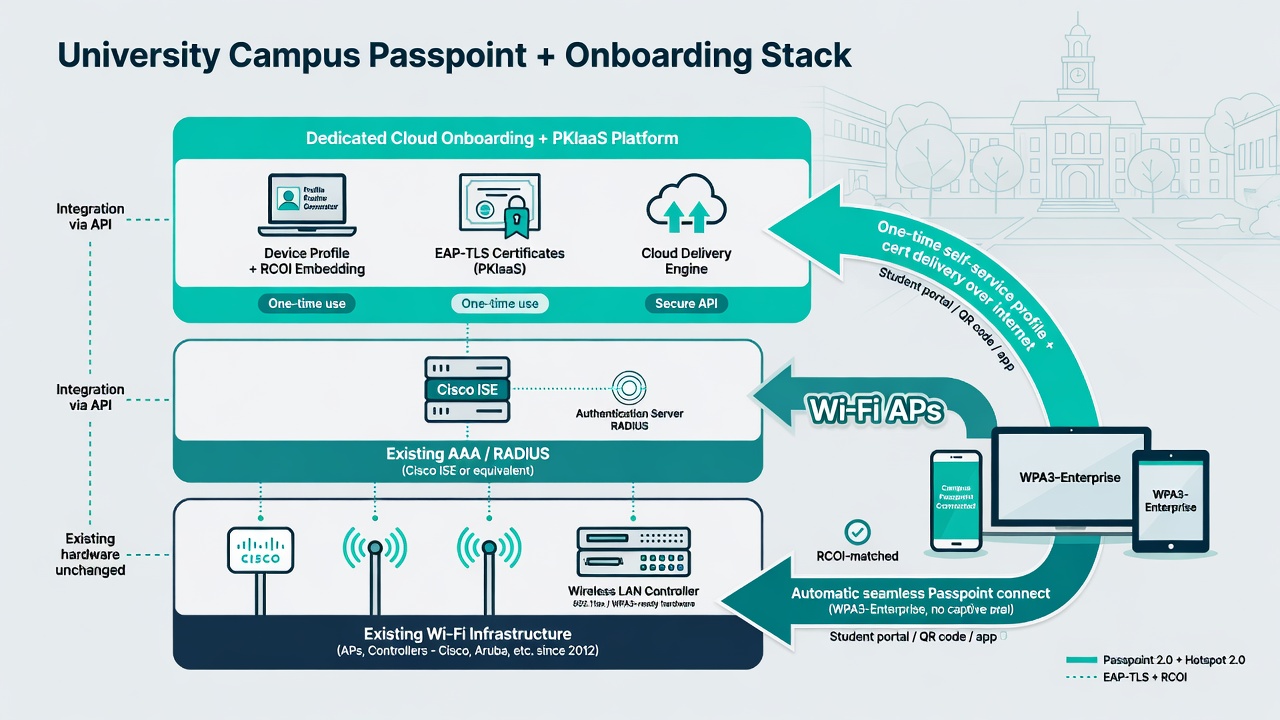
Your existing infrastructure handles the radios and policy. The dedicated onboarding layer supplies the profiles and certificates with the advanced variables (RCOI) that make Passpoint valuable at scale.
The beauty for universities is that this works before the device ever touches the campus network. A new student can complete secure onboarding from their bedroom the week before move-in. When they arrive and open their laptop or phone, it simply joins the correct secure network automatically.
Making Service-Provider-Grade Wi-Fi Easy at Campus Scale
Service-provider-grade means automatic discovery, strong encryption from the first packet, per-user/device identity, seamless roaming, and near-zero user effort — exactly what cellular delivers and what users now expect from Wi-Fi.
Passpoint on the network + a purpose-built onboarding solution is the practical, proven way to deliver that experience without replacing your APs or your AAA platform. The onboarding layer abstracts away the complexity of profile creation, multi-OS quirks (especially Android private CA and certificate installation), RCOI configuration, and internet-accessible enrollment.
Universities that have adopted this model report the same outcomes vendors and operators see in airports and stadiums: support volume collapses, satisfaction rises, and the network team stops spending semesters fighting onboarding fires.
For Technical Teams: Practical Deployment Sequence
- 1. Audit and enable Passpoint on the WLAN. Confirm 802.11u support, turn on ANQP, advertise the RCOIs you intend to use (standard + any custom), configure realms and server trust information.
- 2. Validate RADIUS/EAP-TLS baseline. Ensure your existing AAA (or cloud RADIUS fronting it) correctly handles EAP-TLS with certificate validation and returns appropriate authorization attributes (VLAN, role, bandwidth, etc.).
- 3. Stand up or integrate the onboarding + PKI layer. Choose a platform that can generate Passpoint-compatible profiles containing your RCOI values and can deliver them via internet-accessible flows for all major OSes. Integrate it with your IdP for user authentication during enrollment.
- 4. Pilot in a controlled high-density area. A single residence hall or academic building during a known busy period. Measure discovery success, profile installation rates, authentication success, and roaming behavior.
- 5. Roll out pre-arrival and welcome flows. Make the onboarding link available via admissions portals, housing assignments, QR codes at check-in, and orientation materials. Prioritize new students and their many devices.
- 6. Monitor and iterate. Track ANQP query success, authentication volume and latency during peak events, certificate renewal rates, and any devices falling back to legacy SSIDs. Adjust RCOI advertising or profile settings as policy evolves (new partner locations, segmentation changes).
Because profile logic lives in the onboarding platform rather than on every device or in every AP config, changing roaming policy (new RCOIs, updated partner integrations) becomes a configuration update rather than a mass re-provisioning project.
Passpoint has been production-ready for high-density environments for more than a decade. Your access points and controllers are almost certainly capable today. Your AAA platform already knows how to do policy and 802.1X. What has been missing for most campuses is an easy, scalable way to get the right Passpoint profiles — complete with RCOI and strong EAP-TLS credentials — onto every personal device before users even arrive.
A dedicated onboarding and dynamic PKI platform paired with Passpoint-enabled networks solves exactly that problem. It turns the promise of service-provider-grade Wi-Fi into something that is straightforward to deploy and maintain at the scale of a real university.