Passpoint (also known as Hotspot 2.0 or 802.11u) has been a mature, vendor-supported standard since 2012. The vast majority of enterprise-grade access points deployed in the last decade already support the required features. Traditional Wi-Fi — manual SSID selection, pre-shared keys (PSK), or open networks with captive portals — is the real legacy approach that creates friction, security exposure, and operational drag.
The primary barrier for most organizations is not new infrastructure. It is the ability to intelligently provision Passpoint profiles at scale, including advanced policy variables such as Roaming Consortium Organization Identifiers (RCOI). A dedicated onboarding and dynamic PKI platform is what makes this practical for BYOD, guest, and staff populations — while integrating cleanly with your existing RADIUS/AAA infrastructure.
- • Your existing Wi-Fi access points and controllers are very likely already Passpoint-capable. No forklift upgrade of the radio infrastructure is usually required.
- • Traditional Wi-Fi (PSK or captive portal) forces manual steps on every connection or re-connection, creating persistent user frustration and support load.
- • Passpoint enables automatic, policy-driven, secure (WPA3-Enterprise) connection with no user interaction for properly provisioned devices.
- • The advanced configuration that unlocks real value — especially RCOI for controlled roaming/federation, specific NAI realms, and venue-specific policy — lives in the Passpoint profile, not the access point.
- • A dedicated onboarding solution is the component that lets you create, distribute, and manage those profiles at scale, including the advanced variables most organizations need but have struggled to deploy.
- • This is why many large campuses, hospitals, and venues are discovering they can move to a dramatically better experience without replacing their Wi-Fi hardware.
What "Traditional Wi-Fi" Actually Means in 2026
Most organizations are still operating on one of two legacy models:
- Pre-Shared Key (PSK) networks: Shared passwords that get written on whiteboards, posted on Slack, or captured by anyone in range. No per-user or per-device identity. Revocation is painful. Roaming between venues is nonexistent.
- Open + Captive Portal: No encryption until after the user clicks through a web page. Every connection requires manual intervention. No standardized way to express policy or enable seamless roaming. High support volume for login failures, browser issues, and certificate warnings (if any encryption is attempted).
These approaches were reasonable when Wi-Fi was a nice-to-have amenity. They are increasingly a liability for security, user experience, and operational cost in any environment with repeat users or scale.
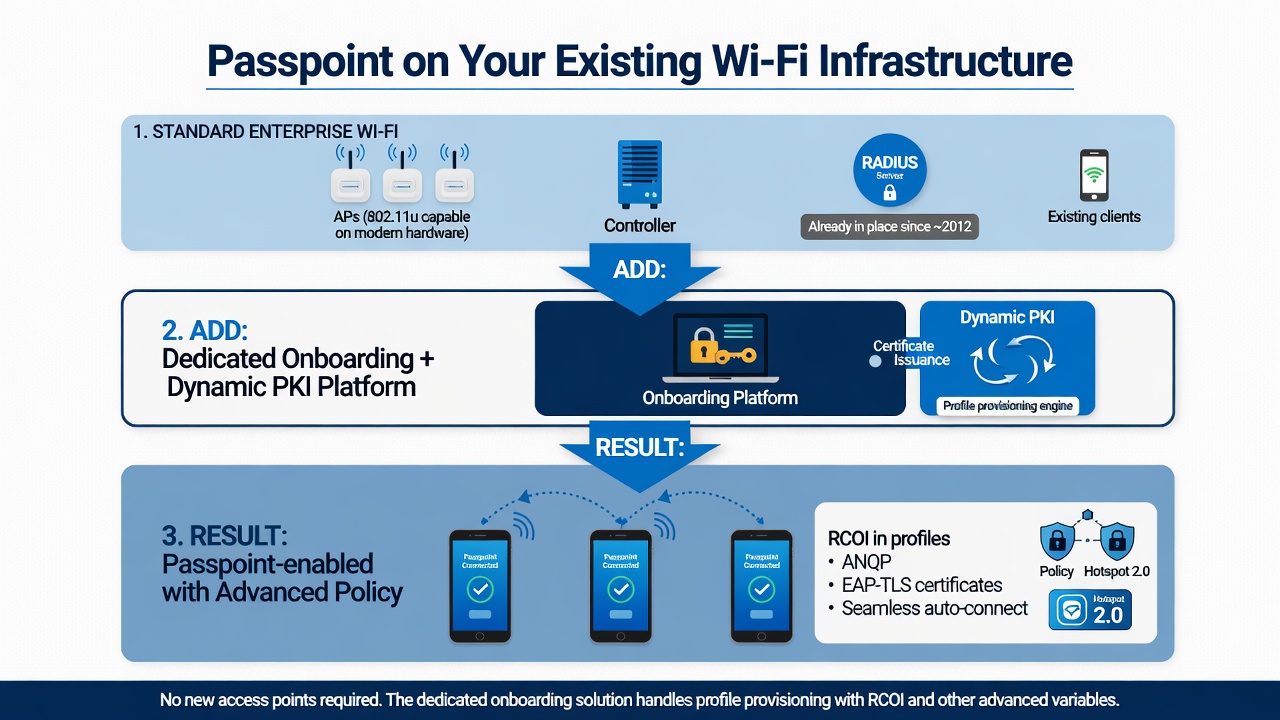
Most organizations already own the bottom two layers. The dedicated onboarding solution supplies the profiles with advanced variables (RCOI, etc.).
Passpoint: The Standard That's Been Ready for Over a Decade
Passpoint was designed to solve exactly the problems of traditional Wi-Fi:
- Automatic network discovery and selection (no manual SSID hunting).
- Secure authentication from the very first packet (WPA2/WPA3-Enterprise + EAP, not open until portal).
- Policy-driven behavior via ANQP (Access Network Query Protocol), including Roaming Consortium Organization Identifiers (RCOI).
- Native support for seamless roaming between different networks when RCOIs match.
Because it has been a Wi-Fi Alliance certification program since 2012, virtually all modern enterprise access points (Cisco, Aruba, Ruckus, Extreme, etc.) support the required 802.11u features. The radio hardware and basic controller configuration have been capable for years.
The Real Barrier: Profile Provisioning and Advanced Configuration
Passpoint only delivers its benefits when client devices have the correct profiles installed. These profiles contain the security credentials (ideally certificates via EAP-TLS) plus the advanced policy elements that make the technology useful at enterprise scale:
- RCOI (Roaming Consortium OI): The 36-bit (or extended) identifier that tells the device which networks it is authorized to join automatically. This is how you control federation, partner roaming, or internal policy groups.
- NAI Realms, venue information, and preferred EAP methods.
- Trust anchors for the RADIUS server certificate.
Manually creating and pushing these profiles to thousands of personal devices is impractical. Native device settings or basic MDM approaches often lack the granularity for RCOI and enterprise policy, or they require the device to already be on the network.
This is precisely where a dedicated onboarding solution becomes the missing (and only) piece most organizations need.
How a Dedicated Onboarding Solution Completes the Picture
A purpose-built cloud onboarding and dynamic PKI platform does the heavy lifting that standard Wi-Fi infrastructure and basic AAA tools were never optimized for:
- Creates and signs Passpoint-compatible profiles with full control over RCOI and other advanced fields.
- Delivers those profiles through guided self-service flows that work over the public internet (before users arrive on site) or via on-site redirects.
- Supports certificate-based (EAP-TLS) credentials so the entire chain — discovery, authentication, and policy — is strong and revocable.
- Integrates with your existing identity provider and RADIUS/AAA infrastructure (Cisco ISE, ClearPass, etc.) so you do not have to rip and replace the policy engine you already own.
- Handles ongoing lifecycle: renewals, updates to RCOI policy, and revocation without forcing users through painful manual processes again.
In short: Your APs and controllers are (or can be) ready. Your RADIUS is ready. What has been missing for most teams is the intelligent, scalable way to get the right Passpoint profiles — with the advanced variables you actually care about — onto the devices that need them.
For Technical Teams: Practical Next Steps
Most enterprise APs already have 802.11u / Hotspot 2.0 features that can be enabled in the WLAN profile. The work is then concentrated on the client side and the onboarding layer:
- Confirm 802.11u support and enable Passpoint / ANQP on the target SSIDs.
- Configure your RADIUS server for the desired EAP method (EAP-TLS is strongly preferred for security and policy control).
- Use a dedicated onboarding platform to define and push Passpoint profiles that include the exact RCOIs you want to advertise and honor.
- Test profile delivery both over the internet (for pre-arrival users) and on-site.
- Monitor connection success and roaming behavior to validate that the RCOI and policy settings are behaving as intended.
Because the heavy lifting of profile creation and delivery moves to the onboarding solution, changes to roaming policy (new RCOIs, partner integrations, etc.) become configuration updates rather than mass device re-provisioning projects.
Passpoint has been production-ready for more than a decade. The Wi-Fi infrastructure you already own can support it. What transforms the experience for users and operations is the ability to provision and manage the client profiles — with full control over advanced elements like RCOI — at the scale of real BYOD and guest populations. That capability is delivered by a dedicated onboarding and PKI platform that works with, rather than replaces, the AAA and access hardware you have today.